Is Your Printer the Biggest Cybersecurity Threat in Your Office?

Is Your Printer the Biggest Cybersecurity Threat in Your Office?

Is Your Printer The Biggest Security Threat In Your Office?
When thinking about cybersecurity threats, most business owners think of phishing emails, ransomware, or weak passwords. But there’s one surprising culprit that’s often overlooked — your office printer.
It may sound harmless, but today’s multifunction printers are connected to your network, store sensitive data, and often lack basic security protections. In fact, a 2020 Cybernews Printer Hack Experiment successfully compromised 56% of 50,000 printers, simply because businesses underestimated the threat.
Let’s break down why your office printer could be a major vulnerability and how to fix it.

Why Are Hackers Targeting Office Printers?
1. They Store Sensitive Business Data
Printers often retain digital copies of documents — contracts, tax forms, employee records — even after printing. This data can be accessed or reprinted by hackers if the device is compromised.
2. Default Passwords Provide Easy Access
Many printers still use factory-default logins like “admin/admin.” Hackers actively scan for these devices online and exploit them with minimal effort.
3. They’re Connected to Your Network
Modern printers connect via Wi-Fi or Ethernet. Once hacked, they can be used as a gateway to your entire IT infrastructure, enabling malware delivery, data theft, or even ransomware deployment.
4. Print Jobs Can Be Intercepted
Without encryption, print jobs can be intercepted mid-transfer. That’s a serious risk if you’re handling financial documents, contracts, or medical records.
5. Firmware is Rarely Updated
Printers are often ignored during routine IT maintenance. Outdated firmware means known vulnerabilities remain unpatched, making your devices easy targets.
6. Discarded Printers May Still Contain Data
When printers are retired without wiping their internal memory, cybercriminals can extract sensitive business data from them.

How to Secure Your Office Printers
Change Default Login Credentials
Replace factory logins with strong, unique passwords. Treat your printer like a network-connected computer.
Update Printer Firmware Regularly
Check for and install firmware updates to patch security vulnerabilities. Your IT provider can automate this process.
Enable Secure Printing and Encryption
Use secure print features and end-to-end encryption to prevent unauthorized access and data interception.
Restrict Access with PINs or User Authentication
Set permissions so only approved employees can print sensitive documents. Use PINs or badges where supported.
Clear Stored Data Periodically
Wipe print queues and hard drives regularly. Before disposing of a printer, ensure its memory is securely erased.
Place Printers Behind a Firewall
Like any other endpoint, printers should be protected with firewall rules to prevent external access.
Monitor Print Logs for Suspicious Activity
Track printing behavior and flag unusual activity. Sudden spikes or prints outside business hours may indicate a breach.

Printers Are Easy to Overlook — But Hackers Don’t
Cybercriminals target what businesses ignore. And since most offices don’t treat printers like high-risk devices, they’re the perfect backdoor into your systems.
Don’t wait until a data breach costs you clients or compliance.

Ready to Secure Your Office Printers?
Get a FREE Network Security Assessment today. We’ll check your printers, network, and connected devices for hidden vulnerabilities — and help you lock them down before hackers find them.

The Fake Vacation E-mail Scam That Could Drain Your Bank Account (And Your Business)

The Fake Vacation E-mail Scam That Could Drain Your Bank Account (And Your Business)

The Fake Vacation E-mail That Could Drain Your Bank Account

Heading on vacation or booking business travel? Watch out.
Cybercriminals are sending fake booking confirmations that look like they’re from Delta, Expedia, Marriott, and other trusted brands. These phishing emails are designed to:
  • Steal login and payment details
  • Infect your devices with malware
  • Access your corporate accounts

How the Scam Works
1. A fake email lands in your inbox.
It looks legit—logos, formatting, even urgent subject lines like:
  • “Flight Change – Action Required”
  • “Your Hotel Itinerary Is Ready”
2. You click the link.
It takes you to a spoofed website that looks real—but it’s stealing your info.
3. Your data is compromised.
Login credentials, credit cards, or even access to your company’s systems could be exposed.

Why It’s So Effective
  • Looks professional – Real logos, familiar formatting
  • Creates urgency – Triggers fast clicks
  • Hits when you’re distracted – Like prepping for a trip or managing travel at work

A Major Risk for Businesses Too
If your team books company travel, this scam is even more dangerous.
One bad click from an admin or travel coordinator could:
  • Expose company cards
  • Compromise business accounts
  • Install malware on your network
 How To Stay Protected
  • Don’t click email links. Type the URL directly.
  • Check the sender’s address. Look for fake domains.
  • Train your staff. Especially those handling bookings.
  • Use MFA to protect accounts even if passwords leak.
  • Secure your email systems to filter out threats.

Get a Free Cybersecurity Assessment
Don’t wait until a fake email causes real damage. We’ll help:
  • Identify weak spots
  • Improve employee awareness
  • Lock down your travel-related risks
[Book your FREE Cybersecurity Risk Assessment now] – and keep hackers off your itinerary.

The Biggest IT and Cybersecurity Mistakes Business Owners Make (And How to Avoid Them)

The Biggest IT and Cybersecurity Mistakes Business Owners Make (And How to Avoid Them)

Generated image
Are you making critical IT and cybersecurity mistakes in your business without realizing it? If you’re like many small and mid-sized business owners, chances are… you are. After years in IT support and cybersecurity consulting, I’ve seen the same issues over and over—often with expensive consequences.
In this article, I’ll break down the most common IT and cybersecurity mistakes businesses make, why they matter, and what you can do right now to protect your company.

1. Treating IT and Cybersecurity as an Afterthought
This is the #1 cybersecurity mistake I see: business owners don’t prioritize security until something breaks.
Even with data breaches constantly in the news, many companies rely on outdated systems or assume a basic firewall and antivirus are enough. Spoiler alert: they’re not.
A single ransomware attack, phishing scam, or data breach can:
  • Shut down operations for days (or longer)
  • Cost tens of thousands in recovery and fines
  • Destroy client trust and damage your reputation
Pro Tip: Cybersecurity should be part of your core business strategy, not a reaction to a crisis.

2. Relying on Free Software or DIY IT Solutions
Looking to cut costs with free antivirus or a DIY Wi-Fi setup?
It might seem like a good move—until you face:
  • A compliance violation for mishandling client data
  • Lost files and no proper backups
  • Hackers exploiting consumer-grade routers or default passwords
If you wouldn’t run your business on a free spreadsheet app, why would you trust your entire IT infrastructure to free tools?
Invest in business-grade IT support and tools designed to protect your data and reputation.

3. Underestimating the Cost of Downtime
Many businesses assume a few hours of downtime is no big deal.
Here’s the reality:
  • Your team can’t access files or systems
  • Your customers can’t place orders or contact you
  • Productivity plummets—and so does revenue
According to recent studies, even one hour of downtime can cost small businesses thousands.
Solution: Have a reliable business continuity plan that includes backups, redundancies, and disaster recovery processes.

4. Failing to Update and Evolve Your Security Strategy
Cybersecurity isn’t “set it and forget it.” Threats change every day.
Hackers get smarter. Tools have become outdated. Compliance rules evolve.
If you haven’t updated your cybersecurity strategy in the last 6–12 months, you’re already falling behind—and putting your business at risk.
Regular IT assessments, system upgrades, and expert reviews are essential for staying secure.

How to Protect Your Business: 3 Simple Steps
  1. Stop cutting corners. Basic protections and free tools won’t cut it anymore.
  2. Think long-term. Build cybersecurity into your strategic planning.
  3. Work with professionals. IT and cybersecurity are too complex (and important) to DIY.

Ready to Strengthen Your IT and Cybersecurity?
Don’t wait until something breaks. Let’s make sure your systems are protected, your data is safe, and your business is ready for anything.
[Click here to book a free 10-minute Risk Assessment] and find out if your business is one click away from disaster.

The Alarming Truth About Chatbot Privacy: What You NEED To Know

The Alarming Truth About Chatbot Privacy: What You NEED To Know

The Dark Side Of Chatbots: Who's Really Listening To Your Conversations?
We understand the growing concern about AI chatbots collecting and potentially misusing your sensitive information. The article you’ve shared highlights a critical issue that affects both individuals and businesses across Northeast Ohio and beyond.
What’s REALLY Happening With Your Data
The information shared in this article confirms what our cybersecurity experts have been warning about: chatbots like ChatGPT, Gemini, Microsoft Copilot, and DeepSeek aren’t just helpful assistants – they’re sophisticated data collection tools.
We’re particularly concerned about several key points:
1. Even when you delete your chat history, these companies retain your data for up to THREE YEARS
2. Your information is being shared with “vendors and service providers” with limited transparency
3. Some platforms like DeepSeek store data on servers in China, creating additional security concerns
4. Companies face regulatory compliance risks when employees share sensitive information with these tools
Our 4-Step Protection Plan For Your Business
Trust Our Local Northeast Ohio Technology Support Team to help you navigate these digital privacy challenges. We’ve developed a comprehensive approach to protect your business:
1. **POLICY DEVELOPMENT**: We’ll create clear guidelines for your team on what information can and cannot be shared with AI tools, tailored to your industry’s compliance requirements.
2. **SECURE ALTERNATIVES**: Our technicians will deploy and configure privacy-focused collaboration tools that keep your sensitive data within your control.
3. **EMPLOYEE TRAINING**: We’ll educate your team on recognizing data privacy risks and using AI tools responsibly.
4. **ONGOING MONITORING**: Rest easy knowing that we genuinely care about your digital security with regular audits and updates to protect against evolving threats.
How Can We Serve You Today?
Business leaders should be free to focus on strategic decisions, not worrying about whether their employees might accidentally leak proprietary information to an AI chatbot.
NOT READY TO COMPLETELY ABANDON THESE USEFUL TOOLS? We understand. Our experienced technicians will help you implement a balanced approach that leverages AI benefits while minimizing privacy risks.
Phone Calls Are Answered Live In 60 Seconds Or Less! Schedule a FREE Consultation with our CEO Adam to discuss your specific concerns about AI privacy and how we can help protect your business data.
Enable your business to thrive in the age of AI without compromising your security or compliance standards.

The Epic Battle: AT&T BGW320 Modem and IP Passthrough (Formerly Known As Bridge Mode)

The Epic Battle: AT&T BGW320 Modem and IP Passthrough (Formerly Known As Bridge Mode)

Trust me when I say that configuring networking equipment in this day and age, should be straightforward. Oh wait, that’s still a pipe dream.  But sometimes, what should be a simple task turns into a multi-hour adventure that tests both your technical skills and your patience. 
Let me take you through my recent journey with an AT&T BGW320 modem that refused to play nicely with my WatchGuard gateway. 
The Initial Setup: Where Hope Still Existed 
The plan looked solid on paper. Enable IP Passthrough on the BGW320, point it to the WatchGuard’s MAC address, and enjoy enterprise-grade security with my AT&T connection. What could possibly go wrong? 
Everything. The answer is everything. As usual. 
The Support Call Marathon 
After enabling IP Passthrough on the modem and configuring the WatchGuard with an external interface using the static IP info given by AT&T, I was met with the networking equivalent of a blank stare. No internet. No connectivity. Just silence and frustration. 
Like many IT professionals before me, I reluctantly picked up the phone and called AT&T support. The first representative was friendly but ultimately unhelpful – a tale as old as time in the tech support world. 
After being escalated to a Level 3 technician, I was hopeful. Surely this networking sage would unlock the mystery! Strike two.  While listening to their tech fumble again and again, his voice began to fade into the background as I took matters into my own hands.   
The Moment of Discovery 
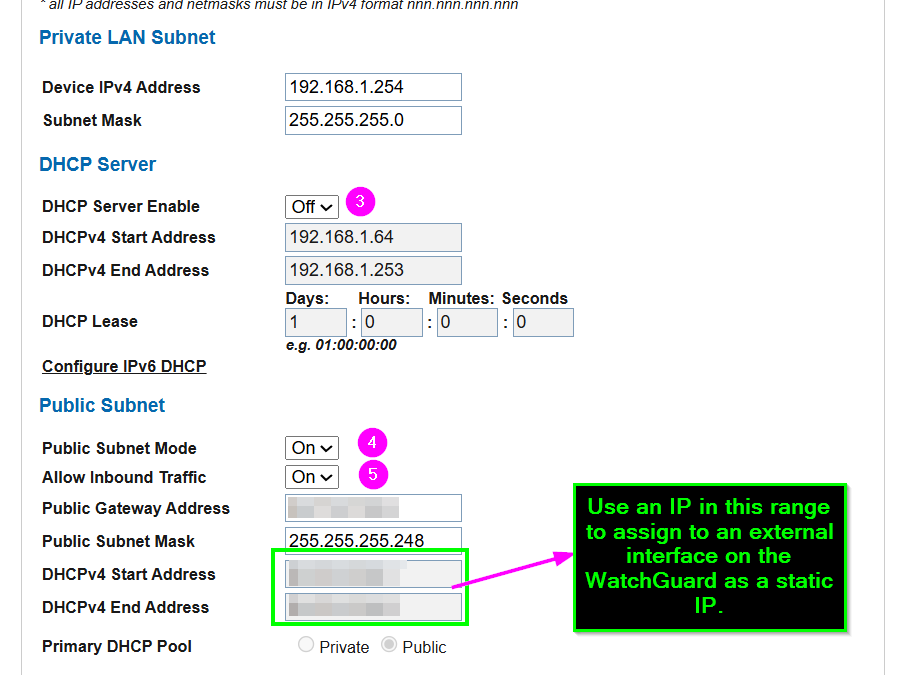
While exploring the BGW320’s labyrinth of settings, I found myself on the “Home Network > Subnets & DHCP” tab – not the first place you’d look for IP Passthrough issues, but networking equipment has never been known for its intuitive design. 
There it was – the Public Subnet area displaying the static IP I wanted to assign to my WatchGuard. I felt like an archeologist discovering a long-lost civilization. “I’m getting close!” I exclaimed to my empty office, startling only my coffee mug. 
The Solution Emerges 
With newfound determination, I made three critical changes: 
1. Disabled the DHCP Server Enable by setting it to “Off”  
2. Ensured both the Public Subnet Mode and Allow Inbound Traffic settings were turned “On” 
3. Assigned a WAN IP on the WatchGuard’s external interface that matched one from the range shown under the DHCPv4 Start Address
A screenshot of a computer  AI-generated content may be incorrect., Picture 
The Sweet Taste of Victory 
After applying these changes…success! I was able to ping 9.9.9.9 and then a hostname on the internet. Internet connectivity restored, security intact, and my sanity barely hanging on by a thread. 
Rest easy0 knowing that should you encounter similar challenges with your AT&T modem and gateway setup, you now have a roadmap to navigate this particularly frustrating corner of networking purgatory. 
Once again, undefeated!