Is Your Printer the Biggest Cybersecurity Threat in Your Office?

Is Your Printer the Biggest Cybersecurity Threat in Your Office?

Is Your Printer The Biggest Security Threat In Your Office?
When thinking about cybersecurity threats, most business owners think of phishing emails, ransomware, or weak passwords. But there’s one surprising culprit that’s often overlooked — your office printer.
It may sound harmless, but today’s multifunction printers are connected to your network, store sensitive data, and often lack basic security protections. In fact, a 2020 Cybernews Printer Hack Experiment successfully compromised 56% of 50,000 printers, simply because businesses underestimated the threat.
Let’s break down why your office printer could be a major vulnerability and how to fix it.

Why Are Hackers Targeting Office Printers?
1. They Store Sensitive Business Data
Printers often retain digital copies of documents — contracts, tax forms, employee records — even after printing. This data can be accessed or reprinted by hackers if the device is compromised.
2. Default Passwords Provide Easy Access
Many printers still use factory-default logins like “admin/admin.” Hackers actively scan for these devices online and exploit them with minimal effort.
3. They’re Connected to Your Network
Modern printers connect via Wi-Fi or Ethernet. Once hacked, they can be used as a gateway to your entire IT infrastructure, enabling malware delivery, data theft, or even ransomware deployment.
4. Print Jobs Can Be Intercepted
Without encryption, print jobs can be intercepted mid-transfer. That’s a serious risk if you’re handling financial documents, contracts, or medical records.
5. Firmware is Rarely Updated
Printers are often ignored during routine IT maintenance. Outdated firmware means known vulnerabilities remain unpatched, making your devices easy targets.
6. Discarded Printers May Still Contain Data
When printers are retired without wiping their internal memory, cybercriminals can extract sensitive business data from them.

How to Secure Your Office Printers
Change Default Login Credentials
Replace factory logins with strong, unique passwords. Treat your printer like a network-connected computer.
Update Printer Firmware Regularly
Check for and install firmware updates to patch security vulnerabilities. Your IT provider can automate this process.
Enable Secure Printing and Encryption
Use secure print features and end-to-end encryption to prevent unauthorized access and data interception.
Restrict Access with PINs or User Authentication
Set permissions so only approved employees can print sensitive documents. Use PINs or badges where supported.
Clear Stored Data Periodically
Wipe print queues and hard drives regularly. Before disposing of a printer, ensure its memory is securely erased.
Place Printers Behind a Firewall
Like any other endpoint, printers should be protected with firewall rules to prevent external access.
Monitor Print Logs for Suspicious Activity
Track printing behavior and flag unusual activity. Sudden spikes or prints outside business hours may indicate a breach.

Printers Are Easy to Overlook — But Hackers Don’t
Cybercriminals target what businesses ignore. And since most offices don’t treat printers like high-risk devices, they’re the perfect backdoor into your systems.
Don’t wait until a data breach costs you clients or compliance.

Ready to Secure Your Office Printers?
Get a FREE Network Security Assessment today. We’ll check your printers, network, and connected devices for hidden vulnerabilities — and help you lock them down before hackers find them.

The Fake Vacation E-mail Scam That Could Drain Your Bank Account (And Your Business)

The Fake Vacation E-mail Scam That Could Drain Your Bank Account (And Your Business)

The Fake Vacation E-mail That Could Drain Your Bank Account

Heading on vacation or booking business travel? Watch out.
Cybercriminals are sending fake booking confirmations that look like they’re from Delta, Expedia, Marriott, and other trusted brands. These phishing emails are designed to:
  • Steal login and payment details
  • Infect your devices with malware
  • Access your corporate accounts

How the Scam Works
1. A fake email lands in your inbox.
It looks legit—logos, formatting, even urgent subject lines like:
  • “Flight Change – Action Required”
  • “Your Hotel Itinerary Is Ready”
2. You click the link.
It takes you to a spoofed website that looks real—but it’s stealing your info.
3. Your data is compromised.
Login credentials, credit cards, or even access to your company’s systems could be exposed.

Why It’s So Effective
  • Looks professional – Real logos, familiar formatting
  • Creates urgency – Triggers fast clicks
  • Hits when you’re distracted – Like prepping for a trip or managing travel at work

A Major Risk for Businesses Too
If your team books company travel, this scam is even more dangerous.
One bad click from an admin or travel coordinator could:
  • Expose company cards
  • Compromise business accounts
  • Install malware on your network
 How To Stay Protected
  • Don’t click email links. Type the URL directly.
  • Check the sender’s address. Look for fake domains.
  • Train your staff. Especially those handling bookings.
  • Use MFA to protect accounts even if passwords leak.
  • Secure your email systems to filter out threats.

Get a Free Cybersecurity Assessment
Don’t wait until a fake email causes real damage. We’ll help:
  • Identify weak spots
  • Improve employee awareness
  • Lock down your travel-related risks
[Book your FREE Cybersecurity Risk Assessment now] – and keep hackers off your itinerary.

The Biggest IT and Cybersecurity Mistakes Business Owners Make (And How to Avoid Them)

The Biggest IT and Cybersecurity Mistakes Business Owners Make (And How to Avoid Them)

Generated image
Are you making critical IT and cybersecurity mistakes in your business without realizing it? If you’re like many small and mid-sized business owners, chances are… you are. After years in IT support and cybersecurity consulting, I’ve seen the same issues over and over—often with expensive consequences.
In this article, I’ll break down the most common IT and cybersecurity mistakes businesses make, why they matter, and what you can do right now to protect your company.

1. Treating IT and Cybersecurity as an Afterthought
This is the #1 cybersecurity mistake I see: business owners don’t prioritize security until something breaks.
Even with data breaches constantly in the news, many companies rely on outdated systems or assume a basic firewall and antivirus are enough. Spoiler alert: they’re not.
A single ransomware attack, phishing scam, or data breach can:
  • Shut down operations for days (or longer)
  • Cost tens of thousands in recovery and fines
  • Destroy client trust and damage your reputation
Pro Tip: Cybersecurity should be part of your core business strategy, not a reaction to a crisis.

2. Relying on Free Software or DIY IT Solutions
Looking to cut costs with free antivirus or a DIY Wi-Fi setup?
It might seem like a good move—until you face:
  • A compliance violation for mishandling client data
  • Lost files and no proper backups
  • Hackers exploiting consumer-grade routers or default passwords
If you wouldn’t run your business on a free spreadsheet app, why would you trust your entire IT infrastructure to free tools?
Invest in business-grade IT support and tools designed to protect your data and reputation.

3. Underestimating the Cost of Downtime
Many businesses assume a few hours of downtime is no big deal.
Here’s the reality:
  • Your team can’t access files or systems
  • Your customers can’t place orders or contact you
  • Productivity plummets—and so does revenue
According to recent studies, even one hour of downtime can cost small businesses thousands.
Solution: Have a reliable business continuity plan that includes backups, redundancies, and disaster recovery processes.

4. Failing to Update and Evolve Your Security Strategy
Cybersecurity isn’t “set it and forget it.” Threats change every day.
Hackers get smarter. Tools have become outdated. Compliance rules evolve.
If you haven’t updated your cybersecurity strategy in the last 6–12 months, you’re already falling behind—and putting your business at risk.
Regular IT assessments, system upgrades, and expert reviews are essential for staying secure.

How to Protect Your Business: 3 Simple Steps
  1. Stop cutting corners. Basic protections and free tools won’t cut it anymore.
  2. Think long-term. Build cybersecurity into your strategic planning.
  3. Work with professionals. IT and cybersecurity are too complex (and important) to DIY.

Ready to Strengthen Your IT and Cybersecurity?
Don’t wait until something breaks. Let’s make sure your systems are protected, your data is safe, and your business is ready for anything.
[Click here to book a free 10-minute Risk Assessment] and find out if your business is one click away from disaster.

The Alarming Truth About Chatbot Privacy: What You NEED To Know

The Alarming Truth About Chatbot Privacy: What You NEED To Know

The Dark Side Of Chatbots: Who's Really Listening To Your Conversations?
We understand the growing concern about AI chatbots collecting and potentially misusing your sensitive information. The article you’ve shared highlights a critical issue that affects both individuals and businesses across Northeast Ohio and beyond.
What’s REALLY Happening With Your Data
The information shared in this article confirms what our cybersecurity experts have been warning about: chatbots like ChatGPT, Gemini, Microsoft Copilot, and DeepSeek aren’t just helpful assistants – they’re sophisticated data collection tools.
We’re particularly concerned about several key points:
1. Even when you delete your chat history, these companies retain your data for up to THREE YEARS
2. Your information is being shared with “vendors and service providers” with limited transparency
3. Some platforms like DeepSeek store data on servers in China, creating additional security concerns
4. Companies face regulatory compliance risks when employees share sensitive information with these tools
Our 4-Step Protection Plan For Your Business
Trust Our Local Northeast Ohio Technology Support Team to help you navigate these digital privacy challenges. We’ve developed a comprehensive approach to protect your business:
1. **POLICY DEVELOPMENT**: We’ll create clear guidelines for your team on what information can and cannot be shared with AI tools, tailored to your industry’s compliance requirements.
2. **SECURE ALTERNATIVES**: Our technicians will deploy and configure privacy-focused collaboration tools that keep your sensitive data within your control.
3. **EMPLOYEE TRAINING**: We’ll educate your team on recognizing data privacy risks and using AI tools responsibly.
4. **ONGOING MONITORING**: Rest easy knowing that we genuinely care about your digital security with regular audits and updates to protect against evolving threats.
How Can We Serve You Today?
Business leaders should be free to focus on strategic decisions, not worrying about whether their employees might accidentally leak proprietary information to an AI chatbot.
NOT READY TO COMPLETELY ABANDON THESE USEFUL TOOLS? We understand. Our experienced technicians will help you implement a balanced approach that leverages AI benefits while minimizing privacy risks.
Phone Calls Are Answered Live In 60 Seconds Or Less! Schedule a FREE Consultation with our CEO Adam to discuss your specific concerns about AI privacy and how we can help protect your business data.
Enable your business to thrive in the age of AI without compromising your security or compliance standards.

The Epic Battle: AT&T BGW320 Modem and IP Passthrough (Formerly Known As Bridge Mode)

The Epic Battle: AT&T BGW320 Modem and IP Passthrough (Formerly Known As Bridge Mode)

Trust me when I say that configuring networking equipment in this day and age, should be straightforward. Oh wait, that’s still a pipe dream.  But sometimes, what should be a simple task turns into a multi-hour adventure that tests both your technical skills and your patience. 
Let me take you through my recent journey with an AT&T BGW320 modem that refused to play nicely with my WatchGuard gateway. 
The Initial Setup: Where Hope Still Existed 
The plan looked solid on paper. Enable IP Passthrough on the BGW320, point it to the WatchGuard’s MAC address, and enjoy enterprise-grade security with my AT&T connection. What could possibly go wrong? 
Everything. The answer is everything. As usual. 
The Support Call Marathon 
After enabling IP Passthrough on the modem and configuring the WatchGuard with an external interface using the static IP info given by AT&T, I was met with the networking equivalent of a blank stare. No internet. No connectivity. Just silence and frustration. 
Like many IT professionals before me, I reluctantly picked up the phone and called AT&T support. The first representative was friendly but ultimately unhelpful – a tale as old as time in the tech support world. 
After being escalated to a Level 3 technician, I was hopeful. Surely this networking sage would unlock the mystery! Strike two.  While listening to their tech fumble again and again, his voice began to fade into the background as I took matters into my own hands.   
The Moment of Discovery 
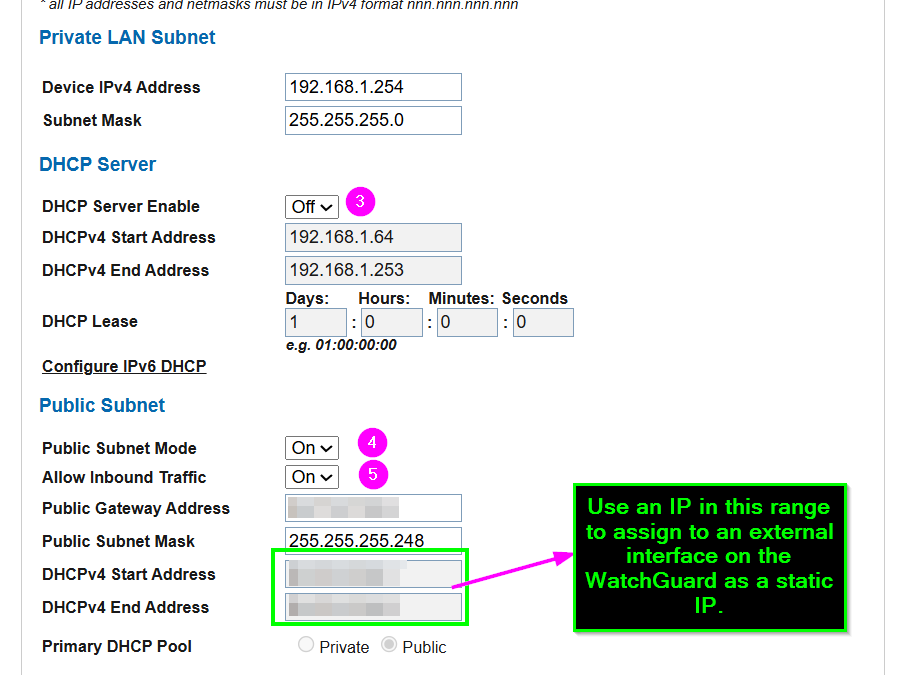
While exploring the BGW320’s labyrinth of settings, I found myself on the “Home Network > Subnets & DHCP” tab – not the first place you’d look for IP Passthrough issues, but networking equipment has never been known for its intuitive design. 
There it was – the Public Subnet area displaying the static IP I wanted to assign to my WatchGuard. I felt like an archeologist discovering a long-lost civilization. “I’m getting close!” I exclaimed to my empty office, startling only my coffee mug. 
The Solution Emerges 
With newfound determination, I made three critical changes: 
1. Disabled the DHCP Server Enable by setting it to “Off”  
2. Ensured both the Public Subnet Mode and Allow Inbound Traffic settings were turned “On” 
3. Assigned a WAN IP on the WatchGuard’s external interface that matched one from the range shown under the DHCPv4 Start Address
A screenshot of a computer  AI-generated content may be incorrect., Picture 
The Sweet Taste of Victory 
After applying these changes…success! I was able to ping 9.9.9.9 and then a hostname on the internet. Internet connectivity restored, security intact, and my sanity barely hanging on by a thread. 
Rest easy0 knowing that should you encounter similar challenges with your AT&T modem and gateway setup, you now have a roadmap to navigate this particularly frustrating corner of networking purgatory. 
Once again, undefeated!   

TRAVEL SEASON ALERT: How to Spot Fake Booking Confirmations

TRAVEL SEASON ALERT: How to Spot Fake Booking Confirmations

A photo of a laptop screen showing a suspicious email with a phishing scam. The screen displays an email inbox, and a highlighted message says 'Your Vacation Has Been Confirmed!' with a 'Click to View' button. A dark hooded figure icon is in the background, symbolizing a hacker. There's also a faint image of a credit card. The environment is minimal, with a neutral background, and the screen is clearly visible. Captured with a DSLR camera, shallow depth of field, professional lighting, modern office setting.
In 2025, travel-related phishing scams have reached an all-time high, with cybercriminals launching increasingly sophisticated attacks that target both individuals and businesses.
Recent studies show that 95% of cybersecurity incidents are primarily due to human error, making these carefully crafted travel scams particularly dangerous. With summer approaching, your business faces heightened risk from these deceptive tactics.
The Alarming Rise of Travel Phishing Scams in 2025
According to the latest cybersecurity data, phishing attacks have surged dramatically, now accounting for 40% of all data breaches reported in 2024. Even more concerning, only 1.6% of senior leaders can correctly identify a phishing scam, leaving businesses extremely vulnerable during peak travel season.
How These Sophisticated Travel Scams Target YOUR Business
Step 1: The Perfectly Crafted Fake Confirmation Email Lands in Your Inbox
These aren’t amateur attempts. Today’s cybercriminals create emails that are virtually indistinguishable from legitimate communications:
  • Professional Design Elements – Using official logos, correct formatting, and authentic-looking customer support information
  • Targeted Subject Lines – Creating urgency with phrases like:
    • URGENT: Your Miami Trip Confirmation – Verification Required
    • ALERT: Flight Schedule Changed – Action Required Within 24 Hours
    • FINAL STEP: Hotel Reservation Pending – Complete Now
Step 2: The Convincing Fake Website Captures Your Credentials
When clicked, these links direct to sophisticated clone websites designed to:
  • Capture login credentials for popular travel platforms
  • Collect payment information for immediate fraudulent transactions
  • Install ransomware on company devices (ransomware attacks increased 50% in February 2025 alone)
Step 3: Your Business Information and Systems Are Compromised
For businesses, the consequences extend far beyond a single compromised account:
  • Access to corporate travel accounts and booking platforms
  • Exposure of company credit card information
  • Potential network-wide malware infection
  • Theft of sensitive employee and client data
Why Even Tech-Savvy Companies Fall Victim to These Scams
  1. Perfect Mimicry – Modern phishing emails perfectly replicate legitimate confirmation emails down to the smallest details
  2. Exploitation of Urgency – Business travelers react quickly to “booking problems” without verifying authenticity
  3. Operational Distraction – Travel coordinators handle hundreds of legitimate confirmations, making fraudulent ones harder to spot
  4. AI-Enhanced Attacks – 87% of security professionals report encountering AI-driven cyber attacks in the past year
7 ESSENTIAL Safeguards for Your Business During Travel Season
  1. Implement Direct Verification Protocols – Train staff to verify bookings directly through official websites or apps, never through email links
  2. Establish Email Authentication Standards – Teach employees to scrutinize sender addresses for subtle inconsistencies (e.g., “@deltaair.net” vs. “@delta.com”)
  3. Create a Company-Wide Travel Booking Policy – Designate approved booking channels and verification processes
  4. Deploy Robust Multi-Factor Authentication (MFA) – Require MFA on all travel-related accounts and company devices
  5. Conduct Regular Phishing Simulations – Test employees with realistic travel-related phishing scenarios
  6. Install Advanced Email Security Solutions – Block malicious links and attachments before they reach employee inboxes
  7. Develop an Incident Response Plan – Create clear procedures for reporting and containing potential breaches
The Cost of Ignoring This Threat Is Too High
The financial impact of cyberattacks continues to soar, with businesses facing an average cost of $4.45 million per data breach. Beyond immediate financial losses, your company risks long-term damage to customer trust and brand reputation.
Protect Your Business Before Your Next Trip
Our FREE Cybersecurity Assessment provides a comprehensive evaluation of your current vulnerabilities and delivers actionable recommendations to strengthen your defenses against these sophisticated travel scams.
Phone Calls Are Answered Live In 60 Seconds Or Less!
Trust our local Northeast Ohio Technology Support Team to protect your business from these evolving threats. We understand that change can be daunting, so we’ll take the time to understand your unique needs and develop a tailored cybersecurity strategy.
Schedule your FREE Cybersecurity Assessment today and rest easy knowing that we genuinely care about your success.

What Happens To Your Applications When Windows 10 Support Ends?

What Happens To Your Applications When Windows 10 Support Ends?

What Happens To Your Applications When Windows 10 Support Ends?
Mark your calendars: October 14, 2025 – the day Windows 10 officially reaches its end of life. After this date, Microsoft will no longer provide security updates, bug fixes or technical support for Windows 10. But what does this mean for your business applications and productivity tools?
If you’re still using Windows 10 after the cutoff date, it’s not just your operating system that will be at risk – your critical business applications could be affected too. Let’s break down what you need to know.
No More Security Updates = Major Vulnerabilities
Once Windows 10 support ends, there will be no more security patches. This means any vulnerabilities discovered after October 14, 2025, will remain unpatched, leaving your applications exposed to cyberthreats.
What This Means For Your Applications:
  • Higher Risk Of Data Breaches: Without security patches, your applications will be more susceptible to hacking attempts, ransomware and other malicious attacks.
  • Compliance Issues: If you’re in a regulated industry (e.g., health care or finance), running applications on an unsupported OS could lead to compliance violations and hefty fines.
  • Productivity Disruptions: If a cyberattack compromises your systems, it could bring business operations to a standstill.
No More Feature Updates = Compatibility Issues Becoming Inevitable
As software vendors continue to release updates and new versions, they’ll eventually stop supporting Windows 10. This means your applications may no longer be compatible with your operating system, leading to:
  • Frequent Crashes And Glitches: Applications may become unstable, crash frequently or fail to launch altogether.
  • Feature Limitations: You might miss out on new features and functionality that are only available on supported operating systems like Windows 11.
  • Security Gaps: Application updates often include security patches. If your OS is no longer supported, the latest security features won’t work, increasing your risk of cyberattacks.
No More Technical Support
It’s not just Microsoft ending support – third-party software vendors will follow suit. As Windows 10 becomes outdated, you’ll notice:
  • No More Technical Support: Software vendors will stop providing customer support for their products running on Windows 10.
  • Lack Of Integration With New Tools: Modern tools and applications will be optimized for Windows 11 and beyond, leading to compatibility issues and reduced productivity.
  • Limited Hardware Compatibility: New peripherals and hardware may not have drivers compatible with Windows 10, limiting your ability to upgrade or expand your setup.
Performance And Productivity Will Suffer
Outdated systems can’t keep up with modern demands. As more advanced applications are developed, they require updated operating systems to run efficiently.
The Impact On Your Business:
  • Slow Performance: Applications may run slower on outdated operating systems, affecting employee productivity.
  • Increased Downtime: More frequent crashes and glitches lead to costly downtime.
  • Maintenance Costs: Keeping legacy systems functional can require more IT resources and expenses, cutting into your bottom line.
What Should You Do?
To ensure your applications continue running smoothly after Windows 10 support ends, consider these steps:
  1. Back Up Your Data – You don’t want to risk losing anything
  2. Decide To Upgrade To Windows 11 Or Replace Your Computer
    • Check Compatibility: Not all devices will support Windows 11. You can use Microsoft’s PC Health Check tool to confirm.
    • Plan For Upgrades: Budget for new hardware if your existing devices are incompatible.
  3. Partner With A Trusted IT Provider – RECOMMENDED
    • Get expert guidance on the best upgrade path for your business.
    • Ensure a smooth transition with minimal disruption to your operations.
    • Implement security measures to protect your data throughout the upgrade process.
Don’t Wait Until It’s Too Late
The end of Windows 10 support is closer than you think. Waiting until the last minute could leave your business vulnerable to cyberthreats, productivity bottlenecks and compliance issues.
Start with a FREE Network Assessment. Our experts will evaluate your current setup, identify application dependencies and help you create a seamless transition plan to ensure your business stays secure and productive.
Click here to schedule your FREE Network Assessment today!
Don’t leave your applications to chance. Take action now to protect your business from the risks of outdated technology.

The Make-Or-Break Factor Failing Business Owners Often Miss

The Make-Or-Break Factor Failing Business Owners Often Miss

The Make-Or-Break Factor Failing Business Owners Often Miss
When it comes to running a business, most owners consider aspects like quality customer service, reliable products or services, and closely monitored P&Ls as reasons for company success or failure. Most never consider one other sneaky element that is often overlooked as a make-or-break factor because it’s “a boring necessity.” What is it?
Your technology.
The technology you choose to use to run your business shapes and drives your success. Dropped calls can affect sales performance. Poor collaboration tools can slow team communication. However, having effective technology and IT support isn’t just about fixing glitches or installing the right software. It’s about leveraging technology strategically to enhance productivity, secure sensitive data and drive growth in all areas of the business.
As we move into Q2, it’s the perfect time to reflect on how technology impacts your business, what updates you’ve made and how they’ve performed so far and, most importantly, whether your current IT support is helping you thrive or holding you back.
The Cost Of Outdated Or Inadequate IT Support
Many businesses settle for mediocre IT support, thinking it’s cost-effective. However, inadequate IT support can cost your business more than you realize:
  • Downtime And Lost Productivity: Poor IT infrastructure leads to frequent downtimes, impacting productivity and revenue.Consider a midsize company experiencing a server failure during peak hours.
This could halt operations, prevent employees from accessing essential applications and delay customer transactions. Even a one-hour outage can lead to significant revenue loss and damage to the company’s reputation.
  • Security Vulnerabilities: Outdated systems are more vulnerable to cyberattacks. Cyberattacks increased by 75% in 2024 compared to 2023, reaching an all-time high in Q3, as companies experienced an average of 1,876 attacks per week! (eccouncil.org)
  • Missed Growth Opportunities: Companies using outdated systems struggle to keep up with competitors who leverage the latest technology for automation, streamlined communication and data analytics.
For example, take a retail business stuck with legacy POS systems that fails to integrate online and in-store sales data. As a result, they will miss out on valuable insights that could have informed inventory management and marketing strategies, leading to lost revenue opportunities.
  • Employee Frustration And Customer Dissatisfaction: Frequent IT issues can frustrate employees, leading to decreased morale and productivity. Persistent technical problems may cause staff to feel unsupported, potentially increasing turnover rates.
But that’s not all; it can affect your customers’ experiences too. Customers expect seamless interactions. System outages or slow response times can lead to dissatisfaction, negative reviews and loss of business.
Example: Imagine an e-commerce site during a flash sale experiencing downtime that leads to abandoned carts and lost sales opportunities, frustrating customers and damaging brand loyalty.
How The Right IT Support Boosts Your Business
Choosing the right IT support isn’t just about having someone to call when things break; it’s about strategically leveraging technology to optimize productivity, secure sensitive data and support your business growth. Here’s how the right IT support can make a measurable impact:
1. Enhanced Productivity And Efficiency
  • Automation Of Routine Tasks: By implementing automation tools such as Microsoft Power Automate or Zapier, repetitive tasks like data entry, customer follow-ups and invoicing can be streamlined, reducing human error and saving valuable time.
  • Cloud-Based Collaboration Tools: Utilizing platforms like Microsoft Teams or Slack, along with cloud storage solutions such as SharePoint or Google Workspace, enables seamless communication and real-time collaboration, whether your team is in the office or remote.
  • Customized Software Integration: Integrating CRM systems (like Salesforce or HubSpot) with your e-mail, calendar and project management tools ensures your team stays organized and productive.
Example: A marketing agency that integrated Slack with Asana and Google Drive reduced project turnaround times by 20%, allowing their team to communicate, share files and track project milestones without switching between platforms. <<DELETE OR SWITCH OUT TO INCLUDE YOUR OWN EXAMPLE/TESTIMONIALS>>
2. Robust Cybersecurity Measures
  • Multilayered Security Approach: The right IT partner will deploy multilayered security solutions, including firewalls, endpoint protection and secure e-mail gateways.
  • Zero Trust Security Model: Implementing a zero trust security model with identity and access management (IAM) solutions so that only authenticated users can access company data.
  • Employee Security Training: Cybersecurity awareness training, including simulated phishing attacks, equips employees with the knowledge to identify and avoid security threats.
Example: After implementing a comprehensive cybersecurity plan, including two-factor authentication and endpoint protection, a financial services firm reduced phishing incidents by 70% in six months. <<DELETE OR SWITCH OUT TO INCLUDE YOUR OWN EXAMPLE/TESTIMONIALS>>
3. Strategic IT Planning And Growth
  • Scalable Infrastructure: Implementing scalable cloud infrastructure (e.g., Microsoft Azure, AWS) allows businesses to grow without the need for costly hardware investments. This ensures your IT environment can handle increased demand during peak periods.
  • Data Analytics And Business Intelligence: Leveraging tools like Power BI or Tableau helps you turn data into actionable insights, enabling data-driven decision-making.
  • Technology Road Maps: Strategic IT partners develop technology road maps aligned with your business goals, ensuring investments in technology that support growth and efficiency.
Example: An e-commerce company used Power BI to analyze sales trends, allowing them to optimize inventory management, which increased sales by 15% during peak seasons. <<DELETE OR SWITCH OUT TO INCLUDE YOUR OWN EXAMPLE/TESTIMONIALS>>
4. Cost Savings And ROI
  • Predictable IT Costs: Managed IT services offer a predictable monthly expense, covering everything from network monitoring and maintenance to security updates. This eliminates surprise repair costs and helps with budget planning.
  • Reduced Downtime Costs: Proactive maintenance and monitoring prevent system failures, minimizing costly downtimes and productivity losses.
  • Cloud Migration And Virtualization: Moving on-premises servers to cloud solutions like Microsoft Azure or Amazon Web Services reduces hardware maintenance costs and energy consumption.
Example: A manufacturing company that migrated to Microsoft Azure saved 30% on IT infrastructure costs while improving system uptime and data accessibility. <<DELETE OR SWITCH OUT TO INCLUDE YOUR OWN EXAMPLE/TESTIMONIALS>>
Key Technologies To Consider When Upgrading
To stay competitive and secure, consider upgrading the following technologies:
  1. Collaboration And Communication Tools: Microsoft Teams, Slack, Zoom and VoIP systems for streamlined communication.
  2. Cloud Solutions And Storage: Microsoft Azure, AWS, Google Cloud for scalable infrastructure and storage.
  3. Cybersecurity Solutions: (It’s recommended NOT to DIY cybersecurity. Work with a professional who knows what you need.)
    • Endpoint Protection
    • E-mail Security
    • Multifactor Authentication
    • Identity and Access Management (IAM)
  4. Data Analytics And Business Intelligence: Power BI, Tableau for data-driven decision-making.
  5. Automation And Workflow Management: Microsoft Power Automate, Zapier for automating routine tasks.
  6. Customer Relationship Management (CRM): Salesforce, HubSpot for better customer management and sales automation.
  7. Backup And Disaster Recovery: Having a hybrid backup plan is best.
  8. Network Security: Advanced firewall protection is important, but work with a professional to get what your company needs.
  9. Virtualization And Remote Access: So employees can work remotely securely.
  10. Hardware Upgrades:
    • Servers: Upgrading to more powerful, energy-efficient servers.
    • Workstations: Transitioning to SSDs for faster performance.
    • Network Equipment: Implementing Wi-Fi 6 routers and switches for improved connectivity.
Ready To Update Your Tech?
We’re offering FREE Network Assessment to help you evaluate your current IT setup and identify growth opportunities.
Ready To Transform Your Business With Better IT Support?
Call us at 216-800-7800 or click here to schedule and discover how the right IT partner can help you achieve your business goals.

A Rising Threat Every Business Owner Needs To Take Seriously

A Rising Threat Every Business Owner Needs To Take Seriously

A Rising Threat Every Business Owner Needs To Take Seriously
Business e-mail compromise (BEC) is quickly becoming one of the most dangerous cyberthreats businesses face. While these scams have challenged organizations for years, the introduction of advanced AI tools has made them more sophisticated – and far more dangerous.
In 2023, BEC scams caused $6.7 billion in global losses. Even more alarming, a study by Perception Point revealed a 42% increase in BEC incidents during the first half of 2024 compared to the same period the year prior. With cybercriminals harnessing AI to refine their techniques, this trend is only accelerating.
What Are Business E-mail Compromise (BEC) Attacks?
BEC scams aren’t your average phishing attempts. They’re highly targeted cyberattacks where criminals exploit e-mail accounts to trick employees, partners or clients into sharing sensitive information or transferring funds.
Unlike generic phishing, BEC scams often involve impersonating trusted individuals or organizations, making them far more convincing and effective.
Why Are BEC Attacks So Dangerous?
BEC scams are alarmingly successful because they rely on manipulating human trust rather than malware or attachments, which can often be detected by filters. Here’s what makes them so destructive:
They can result in:
  • Severe Financial Losses: One convincing e-mail can result in unauthorized payments or data theft. The average loss per attack exceeds $137,000, and recovering stolen funds is nearly impossible.
  • Operational Disruption: An attack can grind business operations to a halt, leading to downtime, audits and internal chaos.
  • Reputational Damage: How do you explain to clients that their sensitive data may have been compromised?
  • Loss of Trust: Employees may feel less secure, knowing their organization was vulnerable.
Common BEC Scams To Watch Out For
BEC scams take many forms. Here are a few of the most common:
  • Fake Invoices: Cybercriminals impersonate vendors and send realistic invoices requesting payment.
  • CEO Fraud: Hackers pose as executives, pressuring employees to transfer funds under tight deadlines.
  • Compromised E-mail Accounts: Legitimate accounts are hacked and used to send malicious requests.
  • Third-Party Vendor Impersonation: Trusted vendors are spoofed, making fraudulent requests appear routine.
How To Protect Your Business From BEC
The good news? BEC scams are preventable with the right strategies in place:
  1. Train Your Team Like It’s Game Day
    • Teach employees to spot phishing e-mails, especially those marked “urgent.”
    • Require verbal confirmation for any financial request.
  2. Enforce Multifactor Authentication (MFA)
    • MFA acts as a safety net, even if a password is compromised. Enable it on all accounts, particularly e-mail and financial platforms.
  3. Test Your Backups
    • Regularly restore data from backups to ensure they work. A faulty backup during an attack could cripple your business.
  4. Get Serious About E-mail Security
    • Use advanced e-mail filters to block malicious links and attachments.
    • Audit access permissions regularly and revoke access for former employees immediately.
  5. Verify Financial Transactions
    • Always confirm large payments or sensitive requests via a separate communication channel, like a phone call.
Next Steps For Security
Cybercriminals are evolving, but you can stay one step ahead. By training your team, securing your systems and verifying transactions, you can turn your business into a fortress against BEC scams.
Want to ensure your business is protected? Start with a FREE Network Assessment to uncover vulnerabilities, secure your systems and keep cybercriminals out.
Click here to schedule your FREE Network Assessment today!

Let’s stop BEC in its tracks – before it stops your business.

Hackers Might Not Ransom You Anymore – They’ll Just Extort You Instead!
Think ransomware is your worst nightmare? Think again.
Hackers have found a new way to hold your business hostage – and it may be even more ruthless than encryption. It’s called data extortion, and it’s changing the rules of the game.
Here’s how it works: They don’t bother encrypting your files anymore. Instead, they just steal your sensitive data and threaten to leak it unless you pay up. No decryption keys, no restoring your files – just the gut-wrenching fear of seeing your private information splashed across the dark web and facing a public data breach.
This new tactic is spreading like wildfire. In 2024 alone, over 5,400 extortion-based attacks were reported worldwide, an 11% increase from the previous year. (Cyberint)
This isn’t just ransomware 2.0. It’s a whole new kind of digital hostage situation.
The Rise Of Data Extortion: No Encryption Necessary
Gone are the days when ransomware simply locked you out of your files. Now, hackers are bypassing encryption altogether. Why? Because data extortion is faster, easier and more profitable.
Here’s how it works:
  • Data Theft: Hackers break into your network and quietly steal sensitive information: client data, employee records, financial documents, intellectual property – you name it.
  • Extortion Threats: Instead of encrypting your files, they threaten to publicly leak the stolen data unless you pay up.
  • No Decryption Needed: Since they’re not encrypting anything, they don’t need to deliver decryption keys. This means they can dodge detection by traditional ransomware defenses.
And they’re getting away with it.
Why Data Extortion Is More Dangerous Than Encryption
When ransomware first hit the scene, businesses were mainly worried about operational disruption. But with data extortion, the stakes are much higher.
  1. Reputational Damage And Loss Of Trust
    If hackers leak your client or employee data, it’s not just about losing information – it’s about losing trust. Your reputation can be destroyed overnight, and rebuilding that trust could take years (if it’s even possible).
  2. Regulatory Nightmares
    Data breaches often trigger compliance violations. Think GDPR fines, HIPAA penalties or PCI DSS infractions. When sensitive data goes public, regulators come knocking with hefty fines.
  3. Legal Fallout
    Leaked data can lead to lawsuits from clients, employees or partners whose information was compromised. The legal fees alone could be catastrophic for a small or midsize business.
  4. Endless Extortion Cycles
    Unlike traditional ransomware, where paying the ransom restores your files, data extortion has no clear endpoint. Hackers can keep copies of your data and re-extort you months – or even years – later.
Why Are Hackers Ditching Encryption?
Simply put: It’s easier and more profitable.
While ransomware is still on the rise – with 5,414 attacks reported worldwide in 2024, an 11% increase from the previous year (Cyberint) – extortion offers:
  • Faster Attacks: Encrypting data takes time and processing power. But stealing data is quick, especially with modern tools that allow hackers to quietly extract information without setting off alarms.
  • Harder To Detect: Traditional ransomware often triggers antivirus and endpoint detection and response (EDR) solutions. Data theft, on the other hand, can be disguised as normal network traffic, making it much harder to detect.
  • More Pressure On Victims: Threatening to leak sensitive data creates a personal and emotional impact, increasing the likelihood of payment. No one wants to see their clients’ personal details or proprietary business information on the dark web.
No, Traditional Defenses Aren’t Enough
Traditional ransomware defenses aren’t effective against data extortion. Why? Because they’re designed to prevent data encryption, not data theft.
If you’re relying solely on firewalls, antivirus or basic endpoint protection, you’re already behind. Hackers are now:
  • Using infostealers to harvest login credentials, making it easier to break into your systems.
  • Exploiting cloud storage vulnerabilities to access and extract sensitive files.
  • Disguising data exfiltration as normal network traffic, bypassing traditional detection methods.
And the use of AI is making everything faster and easier.
How To Protect Your Business From Data Extortion
It’s time to rethink your cybersecurity strategy. Here’s how to get ahead of this growing threat:
  1. Zero Trust Security Model
    Assume every device and user is a potential threat. Verify everything – no exceptions.
    • Implement strict identity and access management (IAM).
    • Use multifactor authentication (MFA) for all user accounts.
    • Continuously monitor and validate devices connecting to your network.
  2. Advanced Threat Detection And Data Leak Prevention (DLP)
    Basic antivirus won’t cut it. You need advanced, AI-driven monitoring tools that can:
    • Detect unusual data transfers and unauthorized access attempts.
    • Identify and block data exfiltration in real time.
    • Monitor cloud environments for suspicious activity.
  3. Encrypt Sensitive Data At Rest And In Transit
    If your data is stolen but encrypted, it’s useless to hackers.
    • Use end-to-end encryption for all sensitive files.
    • Implement secure communication protocols for data transfer.
  4. Regular Backups And Disaster Recovery Planning
    While backups won’t prevent data theft, they’ll ensure you can restore your systems quickly in the event of an attack.
    • Use offline backups to protect against ransomware and data destruction.
    • Test your backups regularly to make sure they work when you need them.
  5. Security Awareness Training For Employees
    Your employees are your first line of defense. Train them to:
    • Recognize phishing attempts and social engineering tactics.
    • Report suspicious e-mails and unauthorized requests.
    • Follow strict access and data-sharing protocols.
Are You Prepared For The Next Generation Of Cyberattacks?
Data extortion is here to stay, and it’s only getting more sophisticated. Hackers have found a new way to pressure businesses into paying ransoms, and traditional defenses just aren’t enough.
Don’t wait until your data is on the line.
Start with a FREE Network Assessment. Our cybersecurity experts will evaluate your current defenses, identify vulnerabilities and implement proactive measures to protect your sensitive information from data extortion.
Click here to schedule your FREE Network Assessment today!
Cyberthreats are evolving. Isn’t it time your cybersecurity strategy evolved too?